For iPhone, iPad and Mac
Words fly away. Notes remain.
Record a meeting, a class, an interview or a passing idea. Jotmatic writes the transcript as you go, then turns it into clear notes, made on your device and never uploaded.
- Made on your device
- No account
- Works offline
- Data Not Collected

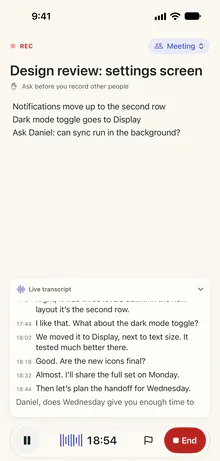
Press record. Jotmatic does the writing.
You stay in the conversation. The notes are waiting when it ends.
Record
One tap in the app, or from the Lock Screen, Control Center, the Action button or Siri. Watch the live transcript, add your own notes, mark a moment or snap a photo of the slide.
Get notes
When you stop, Quick notes pull out the key sentences, tasks and questions, word for word. With Apple Intelligence, AI notes follow, shaped to what you recorded: decisions and action items, an outline and key terms, quotes, new words.
Ask and reuse
Ask your recordings a question and get the answer with the passages it came from. Turn a recording into a recap email, minutes, study notes or a checklist.
Notes shaped to what you record
With Apple Intelligence, the AI notes follow the type you pick, before you start or afterwards. Change it and the notes are made again; the transcript stays.
Meetings
A summary, decisions, action items with owners and open questions, with who spoke labelled. Send tasks to Reminders.
Classes
An outline with timestamps, key terms with definitions, and flashcards to review.
Interviews
Questions and answers, plus exact quotes you can jump back to.
Voice notes
Key points, tasks and ideas from whatever you said out loud.
Language lessons
New words with translations, your teacher’s corrections and flashcards, transcribed in two languages at once.
Prefer a particular style? With Pro on iPhone and iPad, choose one for a client call, a lecture or a stand-up, or write your own instructions.
Built for real life
Everything around the recording, so nothing you heard gets lost.
Quick notes on every recording
The key sentences, tasks and questions, word for word from your transcript, made without Apple Intelligence.
Live transcript
See every word as it’s said, in 40+ languages. Type your own notes next to it and highlight the last 30 seconds.
Ask your recordingsPro
“When did we agree to launch?” Get an answer from your own recordings, with the passages it came from.
Turn intoPro
A recap email, meeting minutes, study notes with quiz cards, a checklist or a clean transcript. Rewrite it shorter or friendlier, or translate it.
Review cardsPro
Key terms and new words become flashcards. Review shows the ones due today, spaced out so they stick.
Find any word you heard
Search every transcript in Jotmatic or in Spotlight. Tap any line to hear it.
Share your way
Text, the audio or a card image, and with Pro, PDF, Word, Markdown, a web page or subtitles. Tasks go to Reminders and cards to Anki.
Lock Screen and Control Center
A Live Activity with Pause, Mark, Note, Photo and Stop. Record from Control Center, the Action button, widgets or Siri.
Up next
Turn it on and your next meeting waits in the Library. One tap records it with the right title and names.
Up to 4 hours
Keeps recording with the screen locked and carries on after calls and interruptions. Nothing is lost if the app closes.
One Tasks list
Every action item from every recording, in one list. Tick them off or send them to Reminders.
Bring in any recording
Open audio from Voice Memos or Files, or write a note without recording. Add misheard names and terms to My vocabulary.
Made on your device. Never uploaded.
Recording, the live and full transcripts, speaker labels and notes are made on your device with on-device models. Nothing is uploaded, and you decide what to share.
No account, no server
There’s nothing to sign up for, and no analytics. We never see or hear your recordings.
Data Not Collected
That’s the App Store privacy label, and the privacy policy says the same in plain words.
Works in airplane mode
After a one-time download of the speech model for each language, everything works offline.
No voiceprints kept
Who spoke is worked out on your device for that one recording, then the voice features are discarded.
Your calls and meetings, on the Mac too
Jotmatic lives in the menu bar. Record your microphone, the sound from your Mac, or both, so a video call is captured clearly from both sides.
- One click from the menu bar. Pin the panel as a floating window on every Space.
- The same notes, made on your Mac. Summaries, tasks and transcripts with speakers, in a Recordings window you can search.
- One purchase. Jotmatic Pro covers your iPhone, iPad and Mac.

Made for every way of working
Start, pause and mark a recording by voice, from the Lock Screen or with a keyboard. Text grows with your settings, and nothing relies on colour alone.
- VoiceOver
- Voice Control
- Larger Text
- Dark Mode
- Increase Contrast
- Reduce Motion
- Captions as transcripts
- Keyboard shortcuts
- Siri and Shortcuts
Start with no account. Add Pro when you want more.
Transcripts are made on your device, so they come with no minute limits.
Jotmatic
No account, no time limit
- Recording, up to 4 hours at a time
- Live transcript in 40+ languages
- Quick notes for every recording
- Search and text export, with no minute limits
- AI notes, who spoke and imports for three recordings
Jotmatic Pro
Yearly with a 7-day trial, monthly, or once for life
- AI notes for every recording: summary, action items, decisions, questions
- Who spoke, PDF and Word export, and imports
- Ask your recordings, and Turn into emails, minutes and study notes
- Notes styles for 1:1s, client calls, stand-ups, exams, or your own
- Flashcards from classes and language lessons, and lessons in two languages
On the Mac, Pro adds AI notes, who spoke and recording this Mac’s audio. One purchase covers iPhone, iPad and Mac. Prices are shown in the App Store in your currency before you buy. The 7-day trial is for eligible new subscribers. Cancel anytime in Settings › Apple Account › Subscriptions.
Questions, answered
Do my recordings leave my device?
No. Audio, transcripts and notes are made and stored on your device. Jotmatic uses the internet only to download a speech model once per language and for App Store purchases; the privacy policy lists each case. Your recordings are included in your own iCloud or computer backup if you have backups on.
Which devices get AI notes?
AI notes need Apple Intelligence: iPhone 15 Pro or newer, iPad with M1 or later or iPad mini (A17 Pro), or a Mac with Apple silicon, with Apple Intelligence turned on, in a language it supports. Every device gets recording, transcripts, Quick notes (the key sentences, tasks and questions, word for word), search and export.
Does it work offline?
Yes. After a one-time download of the speech model for each language, recording, transcription and notes work in airplane mode.
Can it record phone or video calls?
On iPhone and iPad, Jotmatic can record what plays in other apps, such as a video or an online class: choose “This iPhone’s audio” or “Both” and tap Start Broadcast in Apple’s sheet. iOS leaves phone calls out of this, so for a call, put your device near the speaker or use the iPhone’s built-in call recording. On the Mac, choose “This Mac’s audio” or “Both” in the menu bar panel to record a call from both sides.
Which languages does it support?
Transcription uses Apple’s on-device speech recognition, with live transcripts in 40+ languages. The list on your device is in Jotmatic › Languages, and it grows as Apple adds more. Language lessons can be transcribed in two languages at once.
How much is Jotmatic Pro?
You can choose yearly (starting with a 7-day trial for eligible new subscribers), monthly, or a one-time lifetime purchase. The App Store shows the price in your currency before you buy. One purchase covers iPhone, iPad and Mac.
How do I cancel?
On iPhone and iPad: Settings › Apple Account › Subscriptions › Jotmatic Pro. On the Mac: your account settings in the App Store. Purchases and refunds are handled by Apple.
Should I ask before recording?
Yes. In many places you need everyone’s permission to record a conversation. Jotmatic reminds you on the record screen.
Something else? See Support or email support@jotmatic.com.
Keep every word worth keeping
For iPhone, iPad and Mac. Every recording gets a transcript and Quick notes, with no account.